This article is written in Canadian English and intended for readers in Canada.
Microsoft officially ended support and software updates for Windows 8.1 on January 10, 2023. At the same time, Microsoft removed public access to Windows 8.1 ISO downloads from its official website.
As a result, Windows ISO download links that appear on older Microsoft pages are no longer available.
For this reason, this page provides direct links for downloading Windows 8.1 ISO files. Scroll down to locate the 64-bit, 32-bit, and All-in-One (AIO) versions.
Note: Before downloading a Windows 8.1 ISO file, review the official minimum system requirements in the table below:
| Processor (CPU) | 1 GHz or faster, with support for PAE, NX, and SSE2 |
| RAM | 1 GB (32-bit) / 2 GB (64-bit) |
| Installations Storage | 16 GB (32-bit) / 20 GB (64-bit) |
| Graphics | Microsoft DirectX 9 graphics device with WDDM driver |
| Display Resolution | 1024 x 768 for Windows Store apps (standard apps); 1366 x 768 for Snap view (side-by-side apps) |
| Firmware | BIOS or UEFI supported (UEFI required for Secure Boot) |
Make sure your system meets these requirements before proceeding with the download.
If you are looking for Windows 8, see:Download Windows 8 ISO
For additional versions, browse the full database: Windows ISO Download
Windows 8.1 ISO download (64-bit & 32-bit)
Most laptops and desktop computers released between 2009 and 2015 are capable of running Windows 8.1.
You can download Windows 8.1 ISO files using the links below and install the operating system on supported hardware. These download links are hosted on archive.org and point to official Microsoft ISO images.
⬇Windows 8.1 ISO download 64-bit (4 GB)
⬇Windows 8.1 ISO download 32-bit (3 GB)
Installation Notes
Unlike Windows 10 or Windows 11, Windows 8.1 does not allow you to skip the product key entry during setup. The installation process cannot continue without entering a key.
Microsoft provides generic installation keys that allow the setup to finish. These keys do not activate Windows 8.1. The edition that gets installed—such as Core, Pro, or Enterprise—depends on the key entered.
Windows 8.1 Generic Installation Keys
| Edition | Generic Installation Key (offered by Microsoft) |
| Windows 8.1 (Core) | 334NH-RXG76-64THK-C7CKG-D3VPT |
| Windows 8.1 Pro; Windows 8.1 Pro Pack | XHQ8N-C3MCJ-RQXB6-WCHYG-C9WKB |
| Windows 8.1 Enterprise | MHF9N-XY6XB-WVXMC-BTDCT-MKKG7 |
| Windows 8.1 Professional with Media Center | GBFNG-2X3TC-8R27F-RMKYB-JK7QT |
Windows 8.1 ZIP file download
This ZIP archive includes both 64-bit and 32-bit Windows 8.1 ISO files.
⬇Download Windows 8.1 ZIP file (7 GB)
Source: archive.org
During installation, you may use the valid product keys listed below, which are provided by archive.org. Downloading or installing cracked versions of Windows 8.1 is illegal and unsafe and is not recommended.
| Windows 8.1 Pro Product Key: | XKY4K-2NRWR-8F6P2-448RF-CRYQH |
| Windows 8.1 (Standard) Product Key: | FB4WR-32NVD-4RW79-XQFWH-CYQG3 |
You may share this Windows 8.1 ZIP file and the included product keys with others.
Windows 8.1 ISO file download All-in-One
This Windows 8.1 64-bit All-in-One ISO contains Windows 8.1 Core, Windows 8.1 Pro, and Windows 8.1 Enterprise. The edition installed on your PC depends on the product key entered during installation.
⬇Download Windows 8.1 ISO All-In-One file (4.4 GB)
Source: archive.org
Windows 8.1 Pro ISO download
The following links provide direct access to Windows 8.1 Pro ISO files. You must enter a valid Windows 8.1 Pro product key during installation.
⬇Windows 8.1 Pro ISO download 64-bit (x64)
Size: 4 GB
Source: archive.org
⬇Windows 8.1 Pro ISO download 32-bit (x86)
Size: 3 GB
Source: archive.org
How to create a Windows 8.1 bootable USB
Because Windows 8.1 is an older operating system, it is often downloaded for testing. Creating a bootable USB for testing across different computers is usually unnecessary and inconvenient.
Instead, you can use iBoysoft DiskGeeker for Windows to clone the OS partition (C: drive) from a Windows 8.1 computer. This gives you a bootable Windows 8.1 copy that can be used on multiple compatible PCs without any extra configuration.
Steps
- Connect a clean USB drive or external hard drive to the Windows 8.1 computer.
Ensure the drive capacity is larger than the OS partition; otherwise, the cloning process will fail. - Download, install, and open iBoysoft DiskGeeker for Windows.
- The Windows 8.1 system partition will automatically appear in the Source OS disk section.
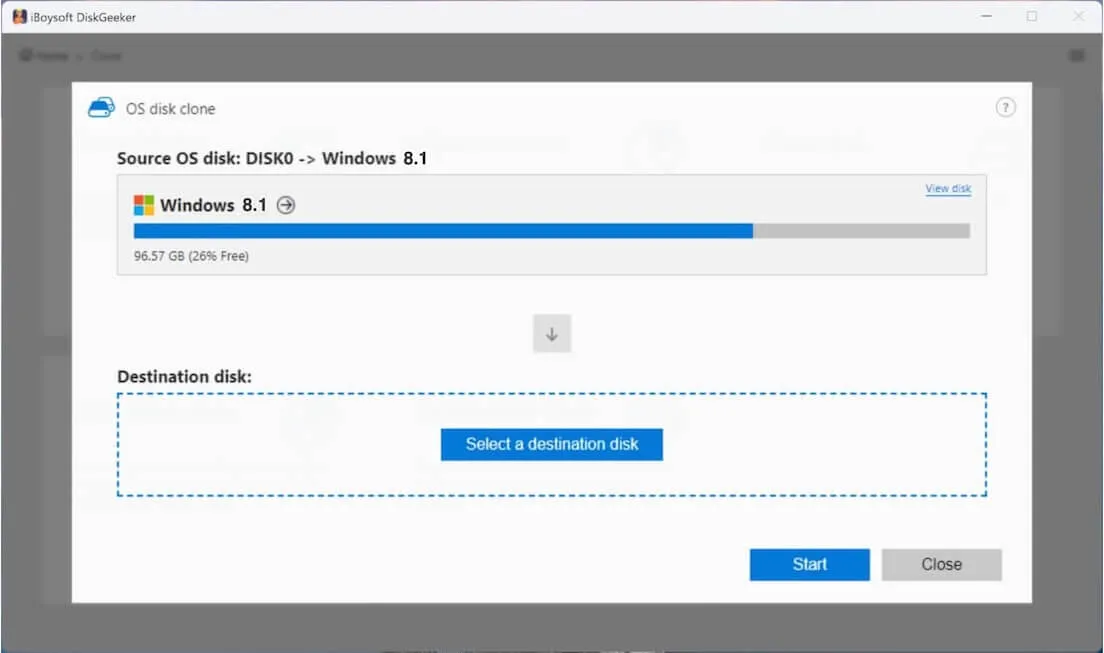
- Click "Select a destination disk" and choose the USB drive or external disk.
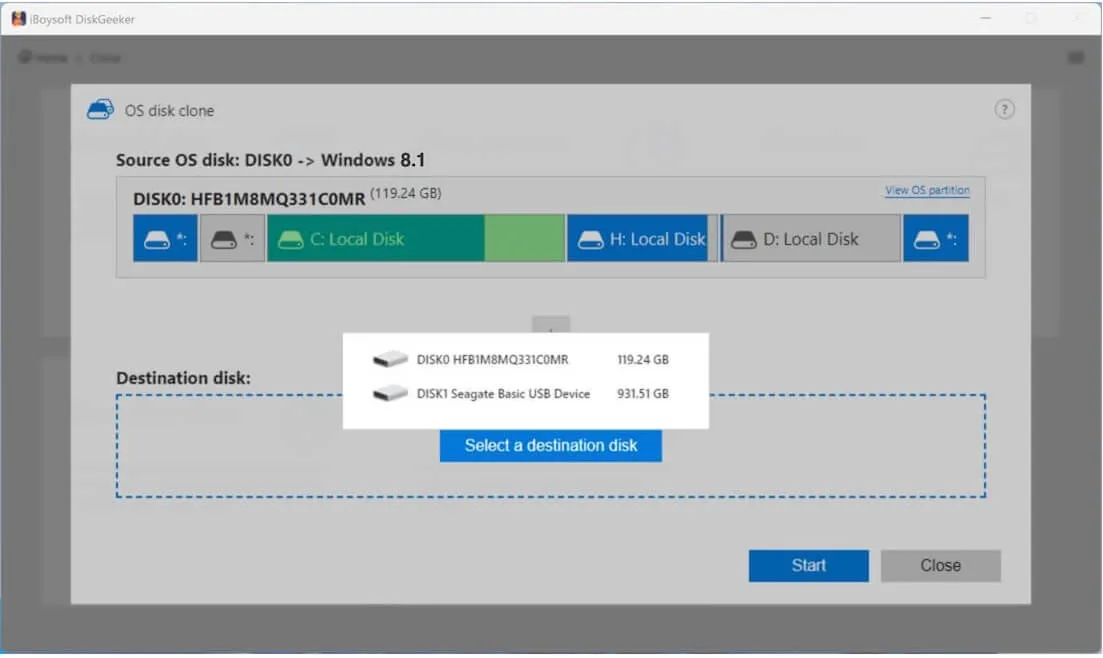
- Click "Start" and confirm the prompt to begin cloning.
After cloning is complete, the bootable Windows 8.1 copy can be connected to compatible computers for testing or used to start a PC that fails to boot.
Use Rufus to create a Windows 8.1 bootable USB
If you need a Windows 8.1 bootable USB for system recovery or reinstallation, you can use Rufus to complete the task.
- Download Rufus from its official website.
- Connect a USB drive with at least 16 GB of storage for 32-bit Windows 8.1 or 20 GB for 64-bit.
- Launch Rufus and select your USB device.
- In the Boot selection section, choose the downloaded Windows 8.1 ISO file.
- Complete the required configuration.
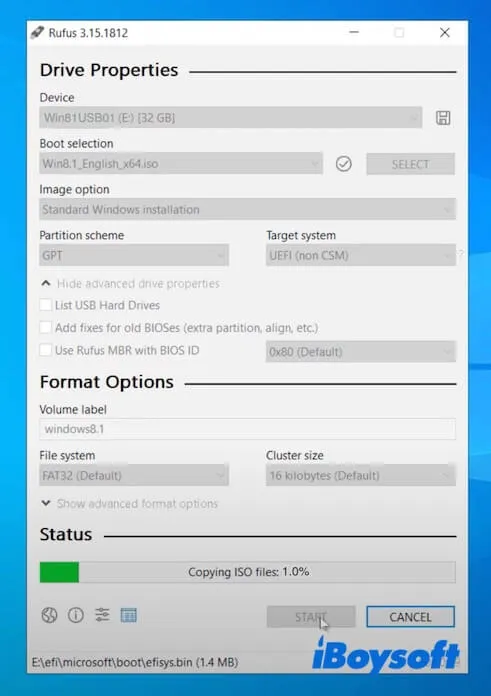
- Click "START."
- Follow the on-screen instructions to finish creating the bootable USB.
Once complete, connect the Windows 8.1 bootable USB to the target PC, restart it, enter the Boot Menu, and follow the instructions to finish installation.
If this article helped you download Windows 8.1 ISO files, feel free to share it with others.
FAQs about Windows 8.1 ISO download
- QCan I download Windows 8.1 ISO for free without a product key?
-
A
Yes. The ISO file can be downloaded without a product key, but installation cannot proceed unless a key is entered. Unlike Windows 10 or Windows 11, the product key screen cannot be skipped.
- QCan Windows 8.1 still be downloaded?
-
A
Microsoft ended support on January 10, 2023, and no longer offers official download options. Windows 8.1 ISO files are now available from archive.org.
- QAre Windows 8 and Windows 8.1 the same?
-
A
No. Windows 8 and Windows 8.1 are different releases within the same Windows generation.